

If you work in construction, property restoration, or insurance claims, you may have come across the term Xactimate. The majority of the people are unfamiliar with the term, some consider it construction trade and others have a guess that this is the name of a software. It is one of the most used estimating platforms in the property insurance industry. But what exactly does it do, and why do contractors rely on it? Come with me to learn all the answers.
What Is Xactimate?
Xactimate is a property estimating software developed by Versik. It assists insurance adjusters, restoration contractors, and other professionals in preparing estimates for property repairs and reconstruction. It is used for preparing insurance claims when there is damage. The majority of engineers use Xactimate for calculating the overall cost of the damage repair or restoration and then provide it to the general contractor or the property managers so they can make informed decisions.
For example, think about a homeowner who has experienced water damage in their kitchen. The property needs drywall removal, flooring replacement, cabinet repair, and repainting. An exact estimate can break this work into individual activities, calculating the required quantities and assigning costs to each repair item.
Simply put, the Xactimate is a platform that aims to help the general contractors and estimators to calculate the cost of repair or renovation. The prepared document is used for filing an insurance claim. However, if there is any inaccuracy, then you might face claim denial. So, ensure that the estimate is accurate and error-free.
In simple terms, Xactimate helps answer three important questions:
- What needs to be repaired or replaced?
- How much material and labor will the work require?
- What is the estimated cost of completing the repairs?

How Does Xactimate Work?
Xactimate follows a structured estimation process. Users collect property information, measure damaged areas, select the necessary repair activities, and calculate the associated costs. Come with me to understand the process of how it works:
Create a Project and Enter Property Information
It begins with entering the data in the platform. It is simple to use, so all you need is to enter the specific information that is mandatory to add and helps to prepare the estimates.
This may include:
- Property address
- Claim or project number
- Type of property
- Date of loss
- Type of damage
- Project specifications
Measure the Damaged Areas
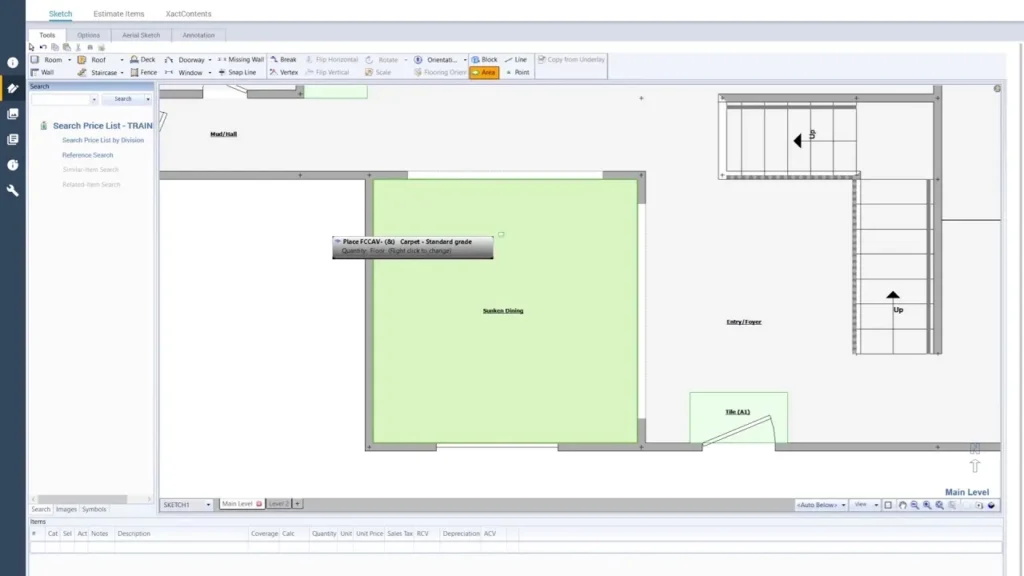
The next phase is the measurement. The affected areas of the property are required to be measured and entered in Xactimate. Measurement can include multiple factors, including floor areas, wall areas, ceiling areas, roof dimensions, linear measurements, and doors and windows.
Select Repair and Replacement Items
When the measurement data is provided to Xactimate, you need to select the items of repair and replacement. For example, a water damaged bedroom may require drywall removal, drywall installation, flooring removal, new flooring installation, interior painting, and baseboard replacement.
Apply Regional Pricing
Once everything is provided to Xactimate, we use regional price lists to calculate estimated repair costs. It is important to use the regional prices of the materials because in the USA, every state has different pricing of the materials. The repair cost may differ from those in Houston or Miami.
Review and Generate the Estimate
After completing the estimate, the estimators go through the estimate and fix any errors regarding the measurements and the pricing. The generated estimate is sent to the approval of quality assurance and then it is delivered to the client.
What Does an Xactimate Estimate Include?
An Xactimate estimate is generally organized into several sections that explain the property, required repairs, quantities, and associated costs. Here is a table of all the components with explanations.
| Component | What It Includes |
| Claim Information | Property details, claim number, and loss information |
| Property Sketch | Room layouts, dimensions, and measurements |
| Line Items | Individual repair and replacement activities |
| Material Costs | Estimated material expenses |
| Labor Costs | Labor associated with repair activities |
| Equipment Costs | Equipment required for specific work |
| Tax and Other Charges | Applicable taxes and additional costs |
| Estimate Summary | Total estimated repair costs |
Do You Need Professional Xactimate Estimating Services?
The problem is that the majority of the general contractors and subcontractors think that the prices of the materials are high, labor wages are unpredictable, and there are permit fees. So, they try to conduct an estimate on their own without professional help. The software provides estimating tools and pricing references, but the estimator must understand the construction activities and property damage. Material requirements and labor calculations.
So, you should spend a few hundred bucks on an estimate to prevent major financial loss.
FAQs
Is Xactimate only used for insurance claims?
Yes, it is used for insurance claims and restoration estimates. The majority of contractors use it for insurance claims.
Is Xactimate difficult to learn?
The basic estimating process is relatively straightforward, but mastering the platform is complex.
Does Xactimate calculate labor and material costs?
Yes, it provides end-to-end support from calculating the labor and material costs to the equipment costs.
How often does Xactimate update its pricing?
Xactimate provides regional price lists that are updated periodically.
Can contractors use Xactimate?
Yes, restoration contractors, roofing contractors, general contractors, and other repair professionals use Xactimate for estimates.